PLEASE NOTE: As an A.G.E.S. Family Member, and you can watch the entire Masterclass Livestream by logging into your EHI Aloha account.
SILENT VIDEO: HOW TO ACCESS THE AGES MASTERCLASS LIVESTREAM – https://drive.google.com/file/d/18AQFqPnJGzta_10mpLe0lG7m8gg2U8uu/view?usp=drive_link
Once the Masterclass is live, you will see a play button where it currently states “OFFLINE.”
LOGGING IN ON A COMPUTER
LOGGING IN ON YOUR CELL PHONE or IPAD
To sign into the A.G.E.S. Masterclass Livestream Chat, follow the steps below:
To access previous Masterclass replays:
Log into your EHI Aloha account using your username (the email you registered with) and password.
You should land on the “My Courses & Replays Dashboard.” If not:
For older replays, scroll down the page until you see “A.G.E.S. Masterclass Replays” and click on the Masterclass you’d like to watch.
As a member, you’ll gain:
The link to become an A.G.E.S. Family Member:
https://www.ehialoha.org/ages-family-membership/
Please see the “What You Get” section at the above link to view all of the AMAZING benefits of being an A.G.E.S. Family Member!
We want our A.G.E.S. Family Members to know exactly where to find their A.G.E.S. Membership PERKS! Please follow the steps below:
Log into your EHI Aloha account.
We recommend logging in a few minutes early to avoid potential delays caused by a high volume of users logging in simultaneously. You’re welcome to start chatting with other members in the Membership Chat while you wait for the session to begin.
Once you are on the livestream page:
Membership proceeds support ongoing research and collaborative efforts, helping us make positive advancements in health education and wellness.
Thank you for trying to help the docs find great products. Please send your product information and supporting research to the docs by clicking on the link below. Please note that the docs are being inundated with product suggestions and it may take time for someone to respond if they find that your product is worth looking at more closely.
https://healingfortheages.com/product-endorsement/
If you cancel after your membership fee has been charged, your membership benefits will continue until the end of that billing month. However, there are no refunds for membership fees once charged.
As an AGES member, you are free to cancel your membership at any time. All members are informed of the free trial period during the sign-up process. It is the member’s responsibility both to manage their subscription and to cancel the membership, when they choose to do so.
If you cancel your membership after being charged, we are unable to refund you. However, you will be able to enjoy the remainder of your AGES Family Membership until subscription expires.
TO CANCEL YOUR AGES FAMILY MEMBERSHIP USING YOUR COMPUTER:
TO CANCEL YOUR AGES FAMILY MEMBERSHIP USING YOUR CELL PHONE or IPAD
NOTE: You must cancel your Monthly Membership Subscription 3-5 business days prior to your next payment date in order NOT to be charged for the following month.
No, we do not provide refunds for membership fees. Once you’ve paid for the month, you will retain access to all A.G.E.S. Family Member benefits until the end of that billing period.
You have two options here – Pause or Cancel
To pause or cancel your A.G.E.S. Family Membership, please follow the steps below:
You may come back to your Subscription to Reactivate your Membership anytime.
In order to download the pdf presentations that have been so lovingly created by the Fabulous Four Docs, please follow the instructions and see the screenshot below.
STEP 1: Log into your account using the email and password you registered with at https://ehialoha.org/.
STEP 2: Scroll down to your Courses & Replays Library.
STEP 3: Click on the course you wish to access (please click on the words and not the purple drop down box.
STEP 4: Click on the course content presentation you wish to access
STEP 5: Below the video presentation you will find the pdf presentations (when offered)
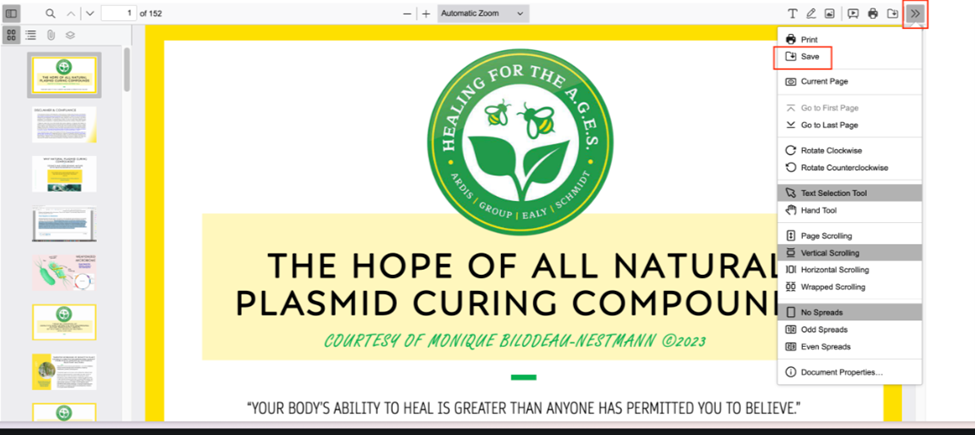
STEP 6: In the top right-hand corner of the pdf presentation you wish to save (the process will be the same for all presentations) you will see two arrows. Click on the arrows and a drop-down menu will appear. Click “Save” and the documents will then be downloaded to your computer. (Please see the image below)
In order to receive your CEU Certificate, you MUST ensure that you have completed ALL of the Course Content and marked every lesson complete. This includes marking the Resource section complete, if there is one, and successfully pass the quiz at the end of each course.
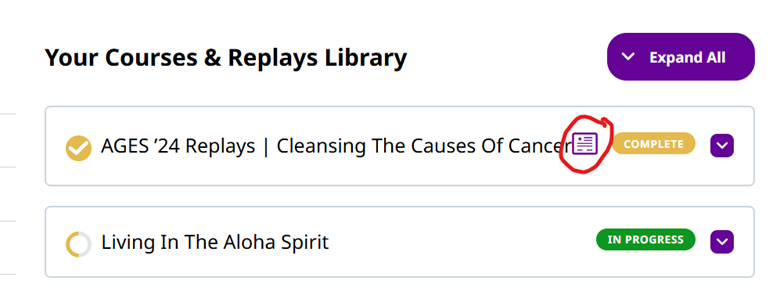
Once all course materials have been completed in their entirety, and marked as such, the course will state “Complete” and an icon will appear next to that course in your “Courses & Replays Library.” Please see the image below for reference. Click on the icon that is circled in the image below, your CEU Certificate will pop up, and you will be able to download it from there.
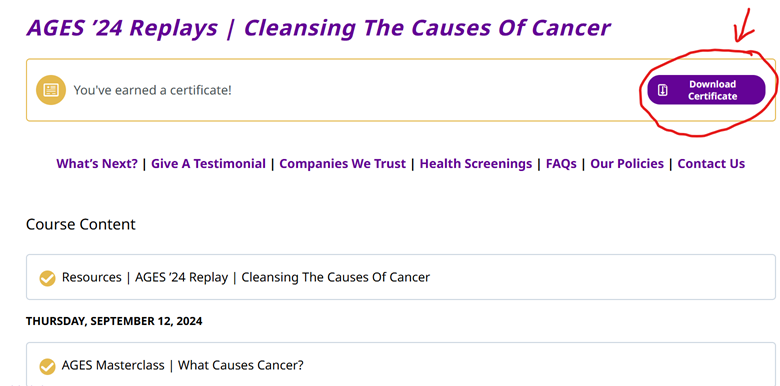
You may also go directly into the course and you can download your CEU Certificate from there. Your Certificate will be located at the top of that page. Please see the image below.
As a friendly reminder, you will need to contact your governing body to determine what CEU’s they will accept.
Go to https://ehialoha.org/.
Use the email address you signed up with as your username.
Enter your password.
If you forget your password, click on the “Lost Your Password?” to reset your password.
Double-check that you’re using the correct email address and password.
If you’re still unable to log in, contact us for further assistance.
Click on Contact Us and complete the form and press submit request. Our customer support team will respond as soon as they can.
STEP 1: Hover over (Computer) or Tap (Cell phone/Ipad) your name in the top right-hand corner.
STEP 2: Select “Account Details” from the dropdown menu.
STEP 3: Scroll to the “Password Change” section.
STEP 4: Enter your new password and click “Save Changes.”
You would have to ask your individual organization/institution what CEUs they accept. EHI Aloha can only approve CEUs for our members/students and has no control over whether or not your CEUs are accepted by your organization/institution once submitted.
You may contact us through our Contact Support page. Our team will do their best to respond to you within 1 – 2 business days.
To update your payment details:
STEP 1 Log into your EHI Aloha account at https://ehialoha.org/my-account/.
STEP 2 Hover over your name in the top left-hand corner.
STEP 3 Select “Payment Methods.“
STEP 4 Update your credit card information as needed.
If you encounter any issues updating your payment method, please contact us for assistance.
Please know that even if you receive two invoices, you WILL NOT be charged twice.
We are aware that some people have received 2 invoices (with different invoice numbers) for a single purchase. We have been working with technical support to resolve this issue, but unfortunately do not have a fix for it yet.
Please do not e-mail support about this issue UNLESS you see a duplicate charge on your card. Thank you!
We provide the downloadable documents for our students, but do not offer printing the documentation and mailing it.
In order to download the pdf presentations that have been so lovingly created by the Fabulous Four Docs, please follow the instructions and see the screenshot below.
STEP 1: Log into your account using the email and password you registered with at https://ehialoha.org/.
STEP 2: Scroll down to your Courses & Replays Library.
STEP 3: Click on the course you wish to access (please click on the words and not the purple drop down box.
STEP 4: Click on the course content presentation you wish to access
STEP 5: Below the video presentation you will find the pdf presentations (when offered)
STEP 6: In the top right-hand corner of the pdf presentation you wish to save (the process will be the same for all presentations) you will see two arrows. Click on the arrows and a drop-down menu will appear. Click “Save” and the documents will then be downloaded to your computer. (Please see the image below)
EHI Aloha loves to refer our students to our parent school EHI to sign up to become a Certified Holistic Nutritionist! Click on the link below to register to become a Certified Holistic Nutritionist:
https://www.energetichealthinstitute.org/what-an-ehi-nutrition-certification-does-for-you/
You have two options here – Pause or Cancel
To pause your A.G.E.S. Family Membership, please follow the steps below:
STEP 1 Log into your EHI Aloha account.
STEP 2 Click on your “My Account.”
STEP 3 Click on “Subscriptions.“
STEP 4 Click on “View.”
STEP 5 Click on “Pause.”
You may come back to your Subscription to Reactivate your Membership anytime.
To cancel your A.G.E.S. Family Membership, please follow the steps below:
STEP 1 Log into your EHI Aloha account.
STEP 2 Click on your “My Account.“
STEP 3 Click on “Subscriptions.“
STEP 4 Click on “View.”
STEP 5 Click on “Cancel.”
You may come back to your Subscription to Reactivate your Membership anytime.
***All Information Shared In Course and on this Site Is For Educational Purposes. All Statements Have Not Been Evaluated By The US Food and Drug Administration (FDA). Go Here For A Current List Of The FDA’s Position On Various Therapeutic Interventions. We Are Required To Inform You That Any Information Presented In This Course and on this Site Is Not Intended To Advise, Diagnose, Treat, Cure Or Prevent Any Disease Including COVID. Additionally, We Are Required To Inform You That Any Information Presented In Course and on this Site Is Not Intended To Constitute Legal Advice Or Service. Always Consult With Qualified Licensed Medical Professionals & Legal Experts Before Enacting Any Information Presented Herein.***
Yes. Please note that all course content is for educational purposes only and should not be substituted for advice from a health professional. Do not follow recommendations expressed in this course without consulting a health professional. The Energetic Health Institute does not necessarily share views expressed by course authors and is not liable for any damages that are directly or indirectly associated with the use of course material.
As a student at EHI Aloha, you will have always have access to your courses/replays. You can access them whenever you want, where ever you are.
In order to receive your certificate for completion of your CEUs, you will be required to answer at least 80% of the quiz questions correctly and completion of a final test will also be required – 80% or more is a pass.
In order to receive your CEU Certificate, you MUST ensure that you have completed ALL of the Course Content and marked every lesson complete. This includes marking the Resource section complete, if there is one, and successfully pass the quiz at the end of each course.
Once all course materials have been completed in their entirety, and marked as such, the course will state “Complete” and an icon will appear next to that course in your “Courses & Replays Library.” Please see the image below for reference. Click on the icon that is circled in the image below, your CEU Certificate will pop up, and you will be able to download it from there.
You may also go directly into the course and you can download your CEU Certificate from there. Your Certificate will be located at the top of that page. Please see the image below.
As a friendly reminder, you will need to contact your governing body to determine what CEU’s they will accept.
You would have to ask your individual organization/institution what CEUs they accept. EHI Aloha can only approve CEUs for our members/students and has no control over whether or not your CEUs are accepted by your organization/institution once submitted.
We recommend logging in a few minutes early to avoid potential delays caused by a high volume of users logging in simultaneously. You’re welcome to start chatting with other members in the Membership Chat while you wait for the session to begin.
We appreciate your support! Membership proceeds fund ongoing research and collaborative efforts to advance health education and solutions.
Please see the link below to become and A.G.E.S. Family member and be a part of this AMAZING community!
https://www.ehialoha.org/ages-family-membership/
Thank you for trying to help the docs find great products. Please send your product information and supporting research to the docs by clicking on the link below. Please note that the docs are being inundated with product suggestions and it may take time for someone to respond if they find that your product is worth looking at more closely.
We invite you to become an A.G.E.S. Family Member! As a member, you’ll be able to participate in our monthly Masterclass livestreams, where you can ask questions in the Members-Only Q&A chat.
Everything that Drs. Bryan Ardis, Ed Group, Henry Ealy & Jana Schmidt and/or any of their special guests’ share is for educational purposes only.
A.G.E.S. Family Members have access to The Fabulous Four via the Q&A chat during our Masterclass Livestreams and Special Events only. This includes their latest research and any personal revelations they share regarding their own health or what they would do in the situations presented to them for educational discussions.
Any questions that an A.G.E.S. Family Member may have for Drs. Bryan Ardis, Ed Group, Henry Ealy & Jana Schmidt or their special guests can be posed during the AGES Members Only Q&A Livestream Chat or in person during live events.
Your question may or may not be picked as a topic of discussion, and Drs. Bryan Ardis, Ed Group, Henry Ealy & Jana Schmidt will do their best to answer as many questions from those in attendance in the time that has been scheduled to answer such questions.
We politely refer all A.G.E.S. Family Members back to their trusted health care teams with specific questions regarding their health. All of us a Healing for the A.G.E.S., including the collaborative organizations (The Dr. Ardis Show, Nature Wins, Global Healing, Global Healing Institute, the Energetic Health Institute, MyEHIAloha.org, Jana’s All Naturals, and any of our special guests and their companies) strongly encourage A.G.E.S. Family Members, as well as our audiences, customers, and students, to perform their own research, ask insightful questions, protect their rights as patients (Please read 1.1.3 (d)), and make the decisions that are best for them and anyone under their guardianship.
Healing for the A.G.E.S. and our aforementioned collaborative organizations are not responsible for anyone’s health. You are responsible for your health and as such assume all risks (and rewards) for any information learned via Healing for the A.G.E.S. Masterclasses, Special Events, and Video Replays explored at your discretion.
We are grateful for your unwavering support as we work tirelessly to usher in the evolution of the medicine God intended for us all and Re-enlighten people all around the world.
Dr. H loves to teach his students how to make their own Holy Water. Check out EHI’s E-Library to learn how you can make your own Holy Water for yourself and your loved ones.
https://www.energetichealthinstitute.org/stop-drinking-the-lies
There are so many fantastic articles posted within the EHI E-Library, when you are in there learning about Holy Water, take the time to check out their other articles. It will time well spent.
Yes, A.G.E.S. Family Members can ask questions during the Members-Only Q&A chat in Masterclass livestreams and special events. However, not all questions may be selected for discussion, and responses are based on educational purposes only. Should you have any specific, personal health related questions, we recommend contacting your trusted healthcare team.
Yes, A.G.E.S. Family Members can ask questions during the Members-Only Q&A chat in We encourage all A.G.E.S. Family Members to seek advice from their trusted healthcare professionals for specific health-related issues. Our collaborative organizations (The Dr. Ardis Show, Nature Wins, Global Healing, Global Healing Institute, the Energetic Health Institute, MyEHIAloha.org, Jana’s All Naturals, and our special guests) promote self-research, patient rights, and informed decision-making for personal healthcare…
You are solely responsible for how you use any information from our Masterclasses, events, and replays. We advise that you approach these materials thoughtfully and consult healthcare professionals for decisions about your health.
In order to download the pdf presentations that have been so lovingly created by the Fabulous Four Docs, please follow the instructions and see the screenshot below.
STEP 1: Log into your account using the email and password you registered with at https://ehialoha.org/.
STEP 2: Scroll down to your Courses & Replays Library.
STEP 3: Click on the course you wish to access (please click on the words and not the purple drop down box.
STEP 4: Click on the course content presentation you wish to access
STEP 5: Below the video presentation you will find the pdf presentations (when offered)
STEP 6: In the top right-hand corner of the pdf presentation you wish to save (the process will be the same for all presentations) you will see two arrows. Click on the arrows and a drop-down menu will appear. Click “Save” and the documents will then be downloaded to your computer. (Please see the image below)
In order to receive your CEU Certificate, you MUST ensure that you have completed ALL of the Course Content and marked every lesson complete. This includes marking the Resource section complete, if there is one, and successfully pass the quiz at the end of each course.
Once all course materials have been completed in their entirety, and marked as such, the course will state “Complete” and an icon will appear next to that course in your “Courses & Replays Library.” Please see the image below for reference. Click on the icon that is circled in the image below, your CEU Certificate will pop up, and you will be able to download it from there.
You may also go directly into the course and you can download your CEU Certificate from there. Your Certificate will be located at the top of that page. Please see the image below.
As a friendly reminder, you will need to contact your governing body to determine what CEU’s they will accept.